A portfolio site for freelance work, from one sentence
Describe your work, your clients and how people should contact you in one sentence, and a free draft of your portfolio site appears in about 10 seconds.
The real example
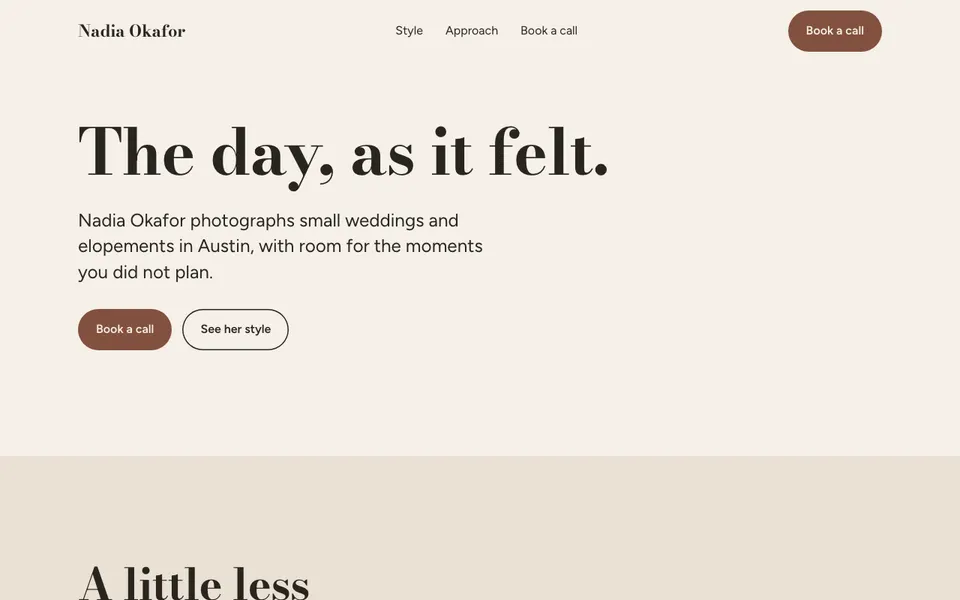
The sentence it was built from
A portfolio for Nadia Okafor, a freelance wedding photographer in Austin. She shoots small weddings and elopements. Show her style, how she works, and how to book a call by email at nadia@example.com.
Built in 6.2 seconds for 0.06 credits. See the receipt · Open the draft
What a portfolio needs to win work
A client reads a portfolio to answer one question: is this person right for my job. Your work shows the skill. Your words show the fit.
So the page should say who you work with, what a project with you looks like, and the next step. A strong portfolio is narrow. It speaks to one kind of client and makes that client feel seen.
Describing your craft in one line
Start with your name and your craft. Add the kind of work you want more of, and where you work. Finish with the one way you want people to reach you.
In our example, Nadia Okafor is a made-up wedding photographer in Austin. Her sentence names small weddings. So the draft speaks to couples who want a small day. It also gives an email for booking a call, which becomes the main button on the page.
If you have a style, name it. Words like warm, candid, moody or bright shape the colours and the tone of the text.
Your work goes in after the draft
The draft has none of your real photos, designs or writing. It holds places for them, with labelled sample text where your facts are missing.
Choose six to ten pieces you would happily repeat. Cut anything that no longer matches the work you want. A client judges you by your weakest piece, so fewer and better wins.
Mistakes that lose freelance clients
A list of every skill you have makes you look like everyone else. Pick the two or three that bring your best jobs.
Hiding how you work makes clients nervous. Say how a project starts, how long it takes, and what they get at the end.
Burying your email on a separate page costs replies. Put it on the first screen and again at the bottom. Ask for changes in plain words, like "move the contact button higher", until it reads right.
Write about the client, not just yourself
Clients care less about your gear or your degree than about their own day, brand or launch. Write each project as a short story about them.
Say what they needed, what you made, and what changed after. Three lines per piece is plenty. Use first names only if the client agreed.
Add one plain line about price, such as where most projects start, if you are happy to share it. Clients who cannot afford you then skip the call, and the ones who write are ready.
Keep the about part short and warm. One photo of you and four lines beat a long life story.
What you get on day one
- A free first draft from one sentence, with no account.
- Changes made by asking in plain words.
- Your real site, built from the draft once you keep it.
- Its own address on syndai.app. One live site is free.
- Every change checked before it goes live, and an undo for any change.
- An email box on the live site that saves everyone who signs up, when your page asks for one.
Prompts to try
A portfolio for Leo Brandt, a freelance logo and brand designer in Denver who works with small coffee roasters. Show three client stories and how to start a project by email at leo@example.com.
A portfolio for Priya Raman, a freelance copywriter in Chicago who writes product pages for skincare brands. Keep it clean and calm, with her process in four steps.
A portfolio for Sam Ortiz, a mural painter in Phoenix who paints walls for cafes and schools. Bold colours, a short story about each wall, and a way to ask for a quote.
After it is live
- Get found
- Syndai looks at what people search for and helps your site answer it.
- Visitor support
- Visitors can ask a question on your site and get an answer from what it says.
- Grow
- Drafts posts and emails to reach new customers, for you to send.
What it costs
The draft is free, with no account. The Free plan comes with 1 live website and 40 credits. The pricing page shows the rest. See pricing
What it does not do yet
- The draft has no photos of your real work, so you add your own pieces after you keep it.
- Clients cannot book a call time or pay a deposit on the site yet.
- There is no blog or private client area on this kind of site yet.
Questions
Can I use it if I am not a photographer?
Yes. It works for any freelance craft, such as design, writing, illustration or video. Name your craft in the sentence and the draft follows it.
Will it add fake clients or testimonials?
No. The draft never invents names, reviews or awards. Anything you did not give it is left out or shown as labelled sample text.
Can I share the draft before I keep it?
Yes. You can share a link to the draft, for example to ask a friend what they think.
Can you tell if a website is AI-generated?
Often, yes, when it is full of vague praise and stock phrases. Your own work, your own words and real details about how you work make a portfolio read as yours.
Describe yours
An account is free too. You get a site you own and 40 credits to start.