A hair salon website from one sentence
Type one sentence about your salon on syndai.ai/build, and a free one-page draft with your services, hours and phone number appears in about 10 seconds.
The real example
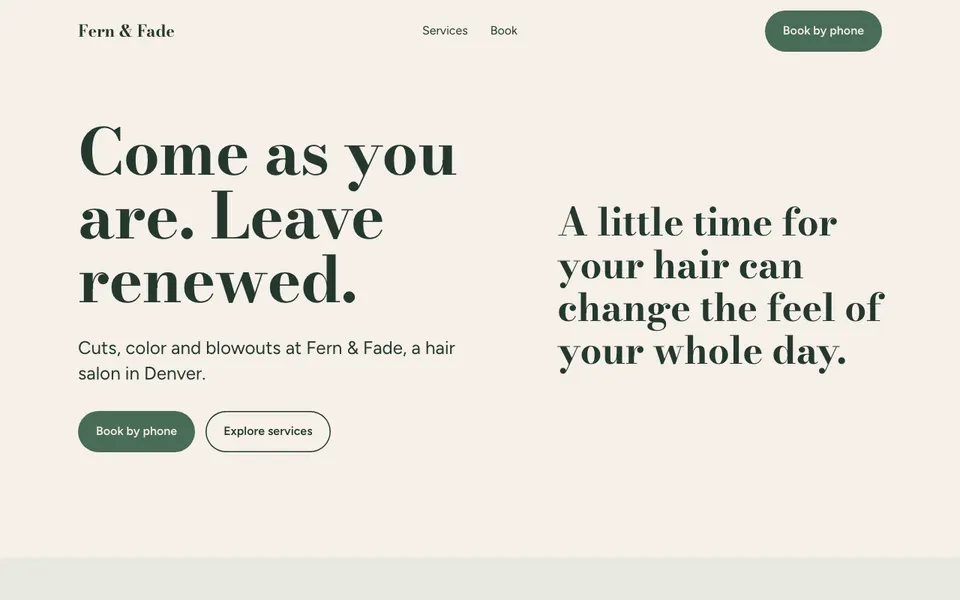
The sentence it was built from
A website for Fern & Fade, a hair salon in Denver. We do cuts, color and blowouts. Book by phone at (303) 555-0164. Open Tue-Sat 9am-7pm.
Built in 5.9 seconds for 0.06 credits. See the receipt · Open the draft
What a salon client looks for first
Most people land on a salon site with one plan. They want to know if you do what they need. Then they want to know when you are open and how to get a chair.
So put those three things in your sentence: services, hours and a phone number. The draft builds the page from them. If you want the number bigger, or the hours higher up, just ask.
Location matters as well. Give the street and the nearest parking or bus stop. A client rushing over after work wants to know where to leave the car. If you sit above a shop or down a side street, one line on how to find the door saves a lost client.
Fern & Fade is a made-up salon
We invented Fern & Fade to show what one sentence gives you. The name and the number are not real. Swap in your own facts and the draft follows them.
The sentence names three services, a phone number and opening days. That is enough for a clear first page. It says nothing about stylists, so the draft does not name any. It gives no prices, so none appear.
Stylists, prices and the chair you want
Clients often pick a salon for one person. If you want each stylist shown, type their names and what they do best. Maybe Ana does balayage and Jo does short cuts. The draft can only show people you tell it about.
Prices work the same way. Many salons list a starting price, like cuts from a set amount, because hair length changes the cost. Type the prices you charge and say "add a price list". If you would rather talk price on the phone, leave them out.
Kids' cuts and men's cuts often cost less, so give them their own lines. A toner or a deep treatment added to color can sit under it as an extra.
Booking by phone, for now
Plenty of salons still book every chair by phone. Give the draft your number and your days, and it tells people to call. That is all most clients need.
If you take walk-ins, say so in plain words. If color needs a patch test 48 hours before, say that too. Small notes like these save you calls from people who were never going to fit.
Shaping the draft in your own words
You change the page by asking. Try "make the top darker" or "move the hours above the services". You can send the draft link to a business partner before you decide.
To keep it, confirm your email. Syndai then builds the real site from the draft. It checks each change before it goes live, and you can undo any change later.
What you get on day one
- A free first draft from one sentence, with no account.
- Changes made by asking in plain words.
- Your real site, built from the draft once you keep it.
- Its own address on syndai.app. One live site is free.
- Every change checked before it goes live, and an undo for any change.
- An email box on the live site that saves everyone who signs up, when your page asks for one.
Prompts to try
A website for a barber shop in Leeds. Skin fades, beard trims and kids' cuts. Walk-ins welcome, Mon-Sat 8am-6pm. Call 0113 496 0721.
A site for a curly hair specialist in Austin. Dry cuts and deep conditioning by appointment. Text or call (512) 555-0188.
A one-page site for a bridal hair and makeup artist who travels to venues around Bristol. Trials on weekday evenings.
After it is live
- Get found
- Syndai looks at what people search for and helps your site answer it.
- Visitor support
- Visitors can ask a question on your site and get an answer from what it says.
- Grow
- Drafts posts and emails to reach new customers, for you to send.
What it costs
The draft is free, with no account. The Free plan comes with 1 live website and 40 credits. The pricing page shows the rest. See pricing
What it does not do yet
- Clients cannot book a time slot online yet; the page points them to your phone.
- Deposits for long color sessions cannot be taken through the site yet, and neither can other payments.
- It has no photos of your salon, your team or your work; you add those after you keep the site.
- It will not add reviews or star ratings for you, even as an example.
Questions
Can I list each stylist and what they specialise in?
Yes. Type each name and their specialty, and the draft shows them. It never makes up stylist names.
Do I have to show my prices?
No. Prices appear only when you type them. Many salons show a starting price for each service.
Can clients book online?
Not yet. The page sends clients to the phone number you give it.
Can the page mention walk-ins or a patch test before color?
Yes. Write it in plain words, like "walk-ins welcome on Saturdays", and the draft adds it.
Describe yours
An account is free too. You get a site you own and 40 credits to start.